Introduction
Compatible devices
- Android : smartphone and tablet
- Apple : iPhone and iPad
- Air³ (dedicated flight tablet)
- Naviter Omni and Oudie N (dedicated flight tablet)
Each device gives access to specific flight applications :
    | |
|---|---|
| AndroidAppleAir3Omni Oudie N | |
 Flyskyhy | ✓ |
 LK8000 | ✓✓ |
 pgpilot | ✓✓ |
 Sports Track Live | ✓✓✓ |
 See You Navigator | ✓✓✓✓ |
| SkyTrackPro | ✓✓ |
 XCSoar JET | ✓✓ |
 XC Track | ✓✓ |
Compatible applications
Flyskyhy

Compatibility iPhone and iPad : download from theApp Store
Official website https://flyskyhy.com
Parameters currently supported by the application:
| Parameters | Update frequency [Hz] |
|---|---|
| Vario calculated by Vector Vario | 5 |
| Heading | 5 |
| TAS (True Airspeed)* | 1 |
| Static pressure | 10 |
| Wind origin and speed* | 0.5 |
| Air temperature | 0.5 |
| GNSS position | 1 |
| Battery capacity | 0.5 |
* Displays TAS and wind from Vector Vario, but uses wind calculated by FlySkyHy (from Vector Vario TAS) for navigation calculations
LK8000

Compatibility Android : download from GitHub
Official website https://lk8000.it
Parameters supported by the application:
| Parameter | Update frequency [Hz] |
|---|---|
| Vario calculated by Vector Vario | 5 |
| Heading | 5 |
| Pitch* | 5 |
| Roll* | 5 |
| Netto | 5 |
| TAS for the anemometer on the ground | 5 |
| IAS for airspeed in flight | 1 |
| Static pressure | 10 |
| Altitude | 1 |
| Wind origin and speed | 0.5 |
| Total acceleration (G) | 1 |
| Air temperature | 1 |
| Relative air humidity | 0.5 |
| GNSS position | 1 |
| Battery capacity | 0.5 |
*Artificial horizon display
pgpilot

Compatibility Android : download from Google Play
Compatibility iOS : download from theApp Store
Official website https://pgpilot.app
Parameters currently supported by the application:
| Parameters | Update frequency [Hz] |
|---|---|
| Vario calculated by Vector Vario | 5 |
| Heading | 5 |
| Static pressure | 10 |
| Wind origin and speed | 0.5 |
| Air temperature | 1 |
| Relative air humidity | 0.5 |
| GNSS position | 1 |
| Battery capacity | 0.5 |
Sports Track Live

Compatibility Android : download from Google Play
Compatibility iOS : download from theApp Store
Official website https://www.sportstracklive.com
Parameters currently supported by the application for Android :
| Parameters | Update frequency [Hz] |
|---|---|
| Heading | 5 |
| Compensated ground glide ratio | 5 |
| TAS for the anemometer on the ground | 5 |
| IAS for airspeed in flight | 1 |
| Altitude | 1 |
| Wind origin and speed | 0.5 |
| GNSS position | 1 |
| Battery capacity | 0.5 |
Parameters currently transmitted by the application for iOS :
| Parameters | Update frequency [Hz] |
|---|---|
| Vario calculated by Vector Vario | 5 |
| Compensated ground glide ratio | 5 |
| Heading | 5 |
| IAS for airspeed in flight | 1 |
| Altitude | 1 |
| Wind origin and speed | 0.5 |
| GNSS position | 1 |
| Battery capacity | 0.5 |
See You Navigator (Naviter)

Compatibility Android, iPhone and Oudie N
Official website https://naviter.com/seeyou-navigator
Parameters currently supported by the application:
| Parameters | Update frequency [Hz] |
|---|---|
| IAS (Indicated Airspeed)* | 1 |
| Static pressure | 10 |
| GNSS position | 1 |
| Battery capacity | 0.5 |
* Used to calculate wind with the SeeYou Navigator algorithm
SkyTrackPro

Compatibility Android and Apple
Official website https://skytrackpro.app/
Parameters currently supported by the application:
| Parameters | Update frequency [Hz] |
|---|---|
| Vario calculated by Vector Vario | 5 |
| Heading | 5 |
| TAS (True Airspeed) | 1 |
| IAS (Indicated Airspeed) | 1 |
| Static pressure | 10 |
| Wind origin and speed | 0.5 |
| Air temperature | 1 |
| GNSS position | 1 |
| Battery capacity | 0.5 |
XCSoar JET

Compatibility Android : download from Google Play
Variables supported by the application:
| Parameters | Update frequency [Hz] |
|---|---|
| Vario calculated by Vector Vario | 5 |
| Heading | 5 |
| TAS (True Airspeed) | 1 |
| IAS (Indicated Airspeed) | 1 |
| Static pressure | 10 |
| Altitude | 1 |
| Wind origin and speed | 0.5 |
| Air temperature | 1 |
| GNSS position | 1 |
| Battery capacity | 0.5 |
XCTrack

Compatibility Android : download from Google Play
Official website https://www.xcontest.org/xctrack
Variables supported by the application:
| Parameters | Update frequency [Hz] |
|---|---|
| Vario calculated by Vector Vario | 5 |
| Heading | 5 |
| Pitch* | 5 |
| Roll* | 5 |
| Compensated ground glide ratio* | 5 |
| Netto | 5 |
| TAS (True Airspeed) | 1 |
| IAS (Indicated Airspeed) | 1 |
| Static pressure | 10 |
| Altitude | 1 |
| Wind origin and speed | 0.5 |
| Total acceleration (G)* | 1 |
| Air temperature | 1 |
| Relative air humidity | 0.5 |
| Change in dew-point temperature* | 1 |
| Theoretical cloud-base altitude* | 1 |
| GNSS position | 1 |
| Battery capacity | 0.5 |
* These variables are displayed in external data.
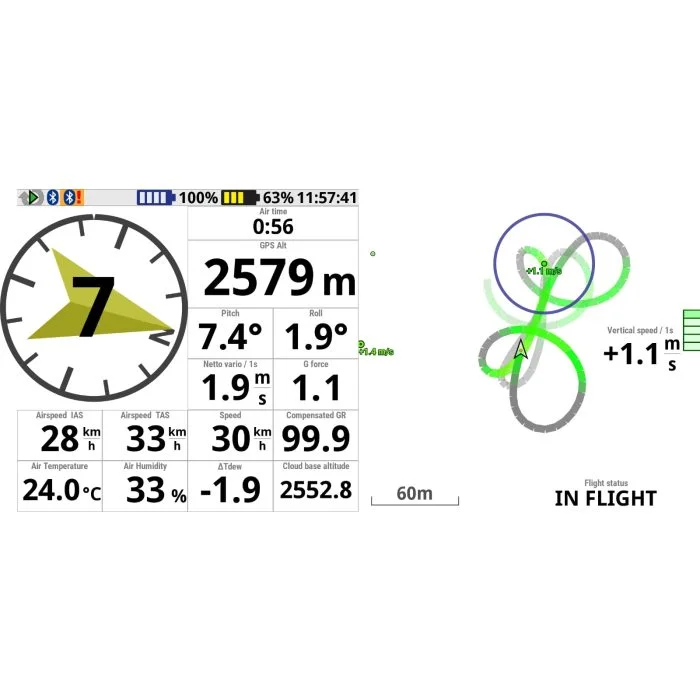
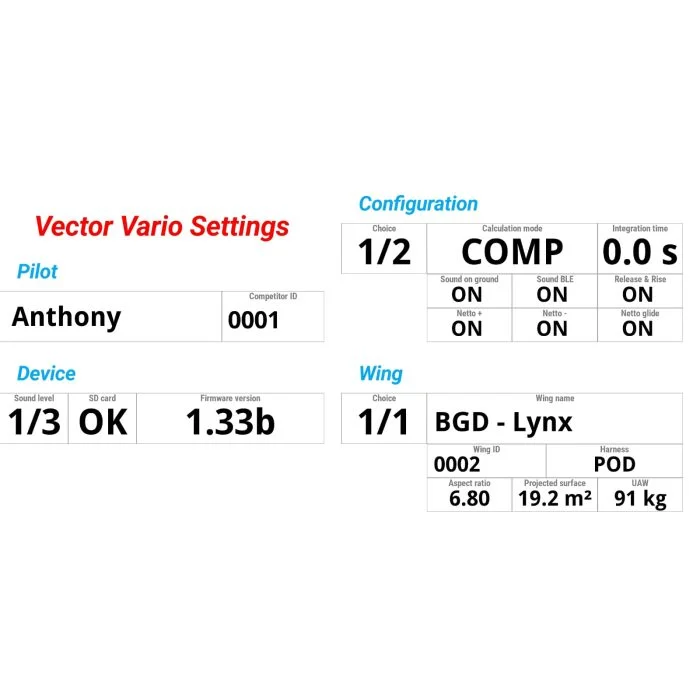
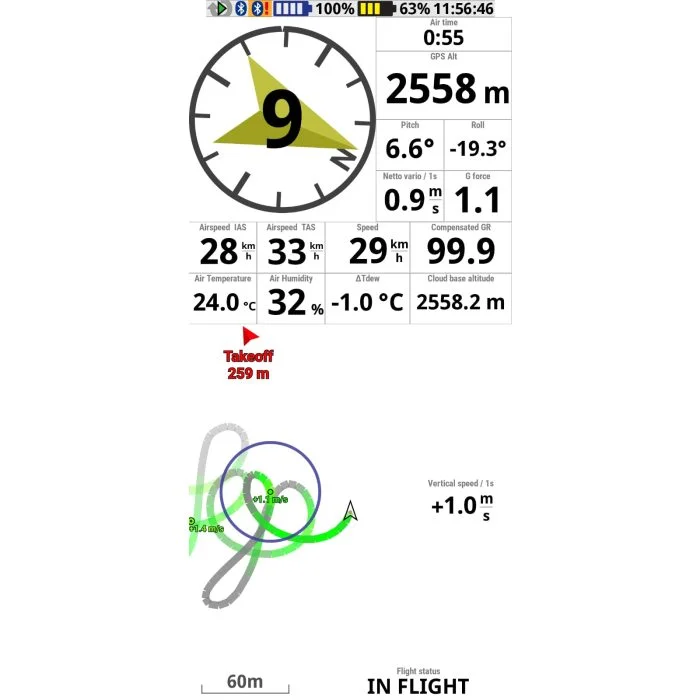
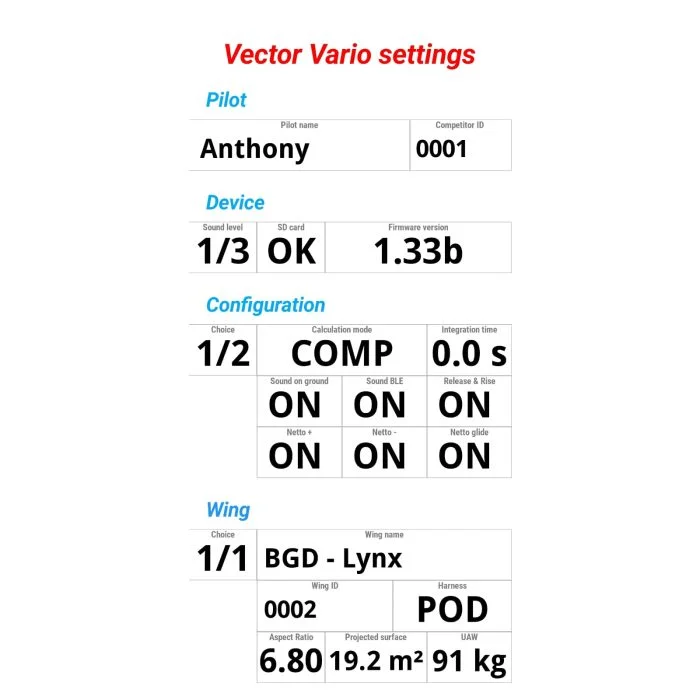
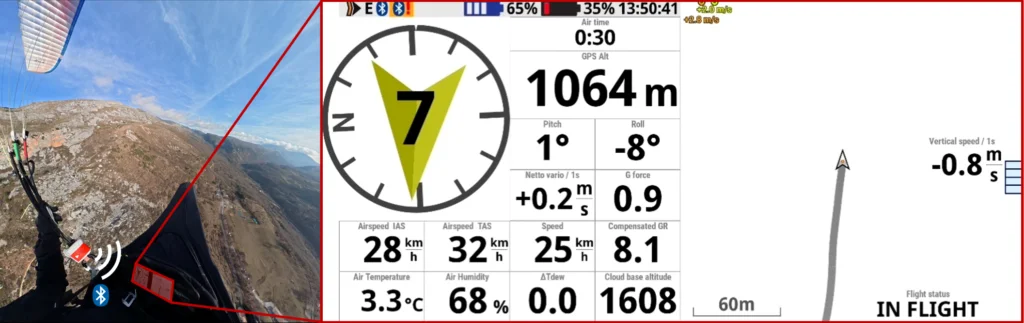
To display an external data value, add an “ External data display” widget, then in its settings adjust the “ Position of the value in the $XCTOD sentence ” according to the table below. From v1.33b, external data can also display many Vector Vario configuration settings.
| # | Parameter |
|---|---|
| 1 | Theoretical cloud-base altitude** [m] |
| 2 | Total acceleration G |
| 3 | Compensated ground glide ratio |
| 4 | Change in dew-point temperature** [°C] |
| 5 | Roll angle [°] |
| 6 | Pitch angle [°] |
| 7 | Software version |
| 8 | Flight status (ON GROUND/ON FLIGHT) |
| 9 | SD card detected (OK/NO) |
| 10 | Volume (0/1/2/3) |
| 11 | Pilot name |
| 12 | Competitor number |
| 13 | Configuration selection (1/2) |
| 14 | Sound on the ground (ON/OFF) |
| 15 | Sound when BLE is active (ON/OFF) |
| 16 | Release & Rise option (ON/OFF) |
| 17 | Netto above sink rate option (ON/OFF) |
| 18 | Netto below sink rate option (ON/OFF) |
| 19 | Netto during accelerated flight option (ON/OFF) |
| 20 | Calculation mode (NORM/COMP) |
| 21 | Integration time [s] |
| 22 | Wing profile selection (1/2/3) |
| 23 | Wing model |
| 24 | Wing serial number |
| 25 | Projected area [m²] |
| 26 | Flat aspect ratio |
| 27 | Harness type (OPEN/POD/SUB) |
| 28 | All-up weight [kg] |
** Experimental.
Example layout file for XCTrack :
layout_vector_vario_v1.xcfg